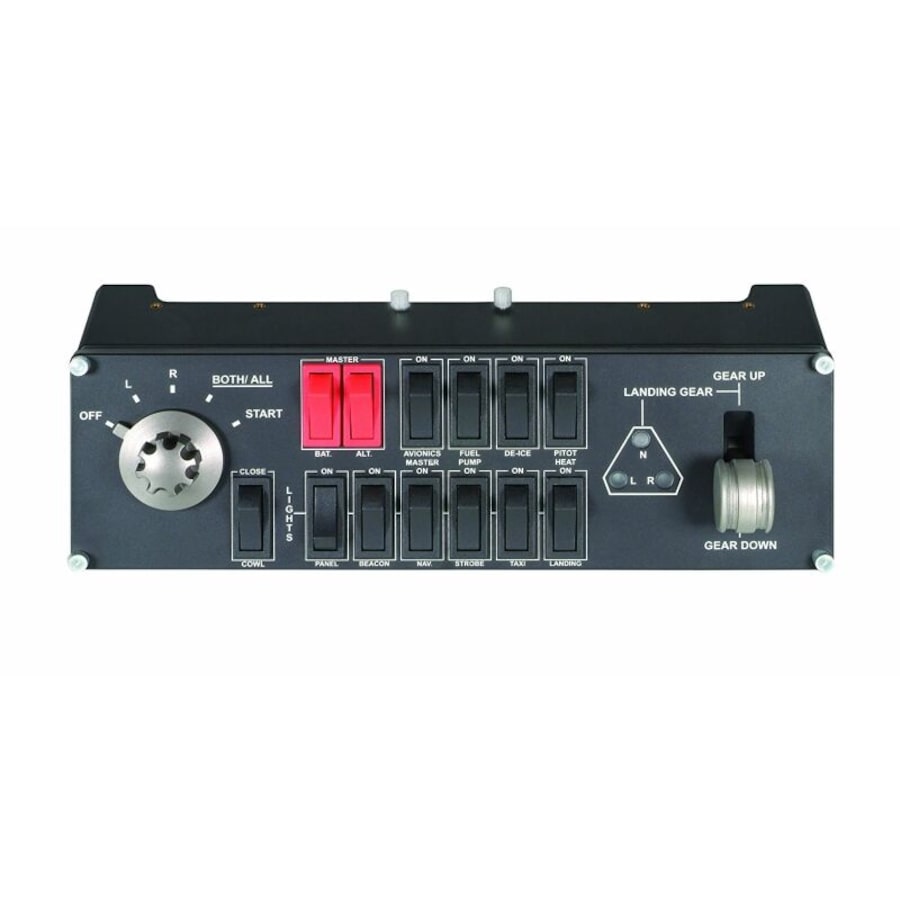
Flight Switch Panel Professional Simulation Switch Controller
128 pts
Collect a minimum of 1x base points- Free shipping on this item
- ETA 06 Apr 2026 - 14 Apr 2026Estimated time of arrival Monday 06 Apr 2026 to Tuesday 14 Apr 2026
- Sold and shipped by Logitechshop
Saitek's Professional Flight Switch Panel is ideal for expanding the number of controls in your flight simulator setup. Attach it to your Logitech G Flight Yoke, place it atop your desk, or even mount it to your own custom cockpit setup. Control your landing gear and lights, engine power and other important aircraft functions, all from one compact unit.
Flight Switch Panel accommodates a wide range of different aircraft and features a five-setting rotary switch that individually controls the magnetos in your plane's ignition system. The 'R' and 'L' positions activate their respective magneto in each engine, 'BOTH/ALL' activates every magneto, and moving to 'START' engages the starter. Once engaged, the engines and magnetos turn, working in unison to fire at exactly the right time in the ignition process.
Bring your plane's landing gear up or down with a satisfying click of an actual control lever. Convenient LEDs provide visual indication of real-time gear status from FSX and Prepar3D. Now you can see the exact state of your landing gear with a mere glance at the Switch Panel.
The Logitech G range of panels can be situated one on top of another or side-by-side. Want the Radio Panel above the Multi Panel? Done. Want your Switch Panel to the left of your Yoke? Go for it. Easy-to-use mounting brackets provide the means to arrange your flight simulation setup in a configuration only limited by your imagination.
Photo for illustration purposes only (Every item is sold seperatly)
Your panel works with Windows 7, 8.1 and 10 and, following the quick installation of a small plug-in from the support page, is compatible with your favorite flight simulation software for PCs including FSX - Flight Simulator X, X-Plane 10, and Prepar3D® 2.2.
Visit the support site from Logitech official site
For a quick simulation configuration to get you in the pilot's seat of an MD80 twin-engine commercial jetliner, this bundle is the recipe:
- 1 Flight Yoke System (Sold seperatly)
- 2 Flight Instrument Panels (Sold seperatly)
- 1 Flight Switch Panel
- 1 Flight Radio Panel (Sold seperatly)
- 1 Flight Multi Panel (Sold seperatly)
- Black: 945-000030
- 2-Year Limited Hardware Warranty
- Windows® 10, Windows 8.1, Windows 7
1-USB 2.0 Port
Internet connection for optional software download
- Flight Switch Panel
Flight Switch Panel brackets
User documentation
- Flight Switch Panel:
Length: 28.2 cm
Width: 6.3 cm
Height: 8.4 cm
Weight (w/o bracket): 369 g
Weight: 549 g
Cable Length (Power/Charging): 1.8 m
Flight Switch Bracket:
Length: 28.2 cm
Width: 8 cm
Height: 8 cm
- Connection Type: USB
USB Protocol: USB 2.0
USB Speed: Full Speed
Indicator LIghts (LED): Yes
LCD Display: No
USB Ports (Built-in): No
Backlighting: No
- Game Compatibility
Compatible with most major simulation software and games, including:
- Flight Simulator X
- Prepar3D® 2.2+
- X-Plane 10
Shipping fees for Everyday Rewards Shop products are determined by our sellers and will be displayed at checkout after you’ve entered your shipping address. However, enjoy free shipping on some select products!
For Everyday Rewards Shop orders, standard shipping policies and estimated delivery times apply based on your location. Please note that we are unable to deliver to PO boxes or parcel lockers.
Please note that express shipping is not available during this time.
This product is sold and shipped by our Everyday Rewards Seller who has provided all relevant product information for this listing. Woolworths Group does not ensure the accuracy or suitability of the information on this page.
RRP: Where an RRP is shown, it refers to the recommended retail price provided by the seller, manufacturer or supplier or is the recently advertised price for the same product on a different online platform. It is not necessarily the price of a product previously offered for sale on Everyday Rewards Shop.
How to stay safe online
For more information on protecting yourself and others from harmful materials, please visit https://www.everyday.com.au/support/how-to-stay-safe-online
See Returns policy for more details.